


Phone dead?
Get a charger in seconds
Rent a power bank
anywhere in New York City
anywhere in New York City
How it works
It's easy
to zap
1
Scan QR Code
2
Charge & Go
3
Return anywhere
All cables included
Lightning, Type-C and Micro-USB
Always nearby
In your favorite cafes and malls

Pricing
Cheaper than
your coffee
First hour
$ 2.5
The rest of the day
$ 2
Every next day
$ 4
Locations
More cities. Coming soon
New York.
Fully charged.
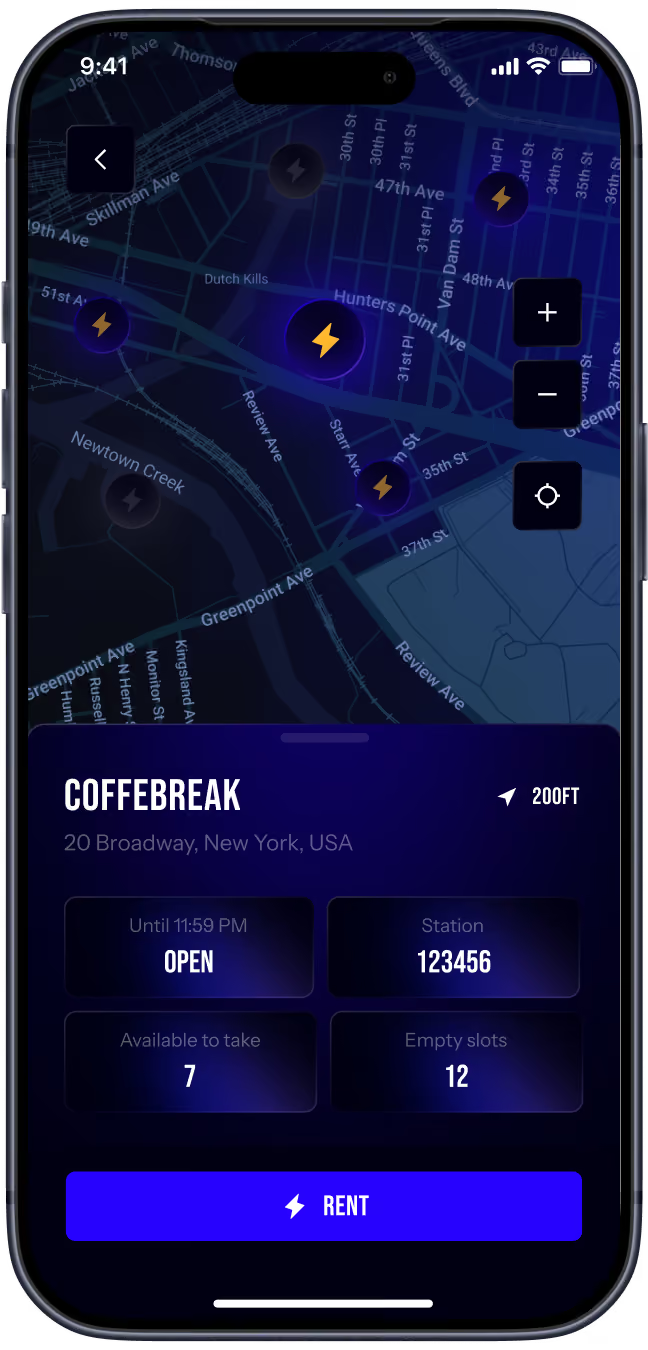
See what's near you — and rent in one tap
More cities. Coming soon


FAQ
How do I rent a power bank?
You can start a rental in two ways:
- Scan the QR code on the GoZap station. You will be directed to download or open theGoZap app, create an account, and start your rental.
- Use the station screen to register, add your payment method, and start your rentaldirectly from the station.
Once your account and payment method are confirmed, the station will release a fully chargedpower bank.
Where can I return the power bank?
You can return your GoZap power bank to any GoZap station in the city. It does not have to bethe same station where you rented it.
How do I return the power bank?
Insert the power bank into an available slot at any GoZap station. Make sure it is fully insertedand wait for the station or app to confirm that your return was successful.
Your rental ends only after the power bank is successfully returned to a GoZap station andconfirmed by the system.
How does payment work?
GoZap rentals are paid by card. Before you start a rental, you will see the applicable rental price,deposit, and any important payment terms.
By starting a rental, you authorize GoZap to charge your payment method for rental fees,applicable taxes, deposit, and any applicable non-return or damage charges under GoZap’sRental & Deposit Policy.
How much does GoZap cost?
GoZap pricing is:
- First hour: $2.50
- Rest of the first day: $2
- Each additional day: $4
- Refundable deposit: $5
Taxes and other applicable charges may apply. Full pricing is shown before you start your rental.
What is the $5 deposit?
The $5 deposit is a temporary refundable deposit for the power bank rental.
The deposit may be released or refunded after the power bank is returned successfully and thereturn is confirmed by the system.
When will my deposit be returned?
Your deposit is released or refunded after your power bank is successfully returned andconfirmed by the system.
Depending on your bank or card issuer, it may take additional time for the release or refund toappear on your account.
Why was I charged $30?
If a power bank is not returned within 7 days, GoZap may charge a $30 non-return purchasecharge.
This charge applies when the power bank is not returned within the required return period, asexplained before rental and in GoZap’s Rental & Deposit Policy.
Can I return the power bank to a different station?
Yes. You can return your GoZap power bank to any GoZap station in the city.
What if the station is full?
If a station has no available return slots, please find another nearby GoZap station in the app.
If you cannot find an available station, contact GoZap Support before leaving the power bankanywhere else.
What if I returned the power bank, but the app still shows an active rental?
Make sure the power bank is fully inserted into the station and wait for confirmation.
If the app still shows an active rental after you returned the power bank, contact GoZap Supportimmediately and provide:
- the station location;
- the time of return;
- your rental ID, if available;
- a photo of the station, if possible.
Can I leave the power bank with venue staff?
No. Your rental does not end by leaving the power bank with restaurant, bar, hotel, or venuestaff.
Your rental ends only when the power bank is returned to a GoZap station and the return isconfirmed by the system.
What if I lose the power bank?
If you lose the power bank, contact GoZap Support as soon as possible.
If the power bank is not returned within 7 days, a $30 non-return purchase charge may apply.
What if the power bank is damaged?
If the power bank is damaged, stop using it immediately and contact GoZap Support.
Do not continue using a power bank that is cracked, swollen, overheating, leaking, smoking, orphysically damaged.
Am I responsible for damage?
You are responsible for returning the power bank in reasonable condition.
GoZap may charge you for loss, non-return, or damage caused by misuse, intentional damage, orfailure to follow safety instructions.
What if the station does not release a power bank?
If the station does not release a power bank after payment confirmation, do not try to force thestation open.
Check the app for instructions. If the issue continues, contact GoZap Support and provide:
- station location;
- time of attempted rental;
- payment confirmation, if available;
- screenshot or photo of the issue.
What if the power bank does not charge my phone?
First, check that the cable is properly connected to your phone.
If the power bank still does not charge your phone, stop using it and contact GoZap Support. Wemay ask for your rental ID, station location, and a photo of the power bank.
What if the app is not working?
Try closing and reopening the app, checking your internet connection, and making sure you areusing the latest version of GoZap.
If the issue continues, contact GoZap Support.
What if I was charged incorrectly?
If you believe there was an incorrect charge, contact GoZap Support with:
- your account email or phone number;
- rental ID;
- date and time of the charge;
- amount charged;
- screenshot of the charge, if available.
We will review your request according to GoZap’s Refund Policy.
What should I do if the power bank gets hot?
Some warmth during charging may be normal. However, if the power bank becomes unusuallyhot, stop using it immediately and place it in a safe, dry area away from heat, water, andflammable materials.
Contact GoZap Support as soon as possible.
What should I do if the power bank is swollen, smoking, leaking, or damaged?
Stop using it immediately.
Do not charge it, open it, puncture it, shake it, or put it near heat or water. Keep it away fromyour body and flammable materials, then contact GoZap Support immediately.
Can I open or repair the power bank myself?
No. Do not open, modify, repair, or tamper with any GoZap power bank or station.
Can I use the power bank in rain or near water?
No. Keep the power bank dry. Do not use it in rain, near water, or in wet conditions.
How do I contact GoZap Support?
You can contact GoZap Support through the app.
Go to:
Settings > Contact Support
You may also contact us by:
- Email: gozapsupport@gmail.com
- Phone: [support phone]
- Telegram: t.me/GoZapSupport
What information should I provide when contacting support?
To help us resolve your issue faster, please include:
- your account email or phone number;
- rental ID, if available;
- station location;
- date and time of the issue;
- screenshots or photos, if helpful;
- a short description of what happened.
When should I contact support?
Contact GoZap Support if:
- the station did not release a power bank;
- the station did not accept your return;
- your rental is still active after return;
- you believe you were charged incorrectly;
- the power bank is lost or damaged;
- the power bank overheats or looks unsafe;
- you need help with your account.